
我的博客已经上线很久了,他是由typecho搭建的。我一直一个计划,把博客的技术部分文章与生活分离开来,正好最近我的最近博客服务器到期了,迁移的时间到了。本文将记录我的迁移过程。
为什么迁移?为什么迁移到vitepress?
为什么迁移呢?首先是博客站内容混杂,我想将生活与工作内容分开来,其次是静态化是一个趋势,毕竟我的是私人博客而不是论坛,所以静态站是自然而然成为了我的选择。并且如果静态化完成,那么我以后网站的图片问题与其他一些问题都将解决。
为什么选择vitepress呢?总所周知,李哥是一个vue玩家,有vue选vue没vue选jquery,实在不行才会自己写。我考察过hugo,hexo最终选择了我熟悉的vue生态方便我做后续开发。
迁移过程
首先我要从原站上导出markdown文件。这个插件很多,在github上随便找一个就行。我这里使用的是Typecho-Plugin-Tp2MD。
导出后的文件内容格式如下:
---
layout: post
cid: 568
title: 算法复杂度分析
slug: 568
date: 2025/06/02 17:37:00
updated: 2025/06/02 17:43:38
status: publish
author: 李哥
categories:
  - 大数据、算法与AI
tags:
  - 算法基础
---

首先算法和数据结构是分不开的,数据结构是数据的组织方式,算法是数据的操作方式(也就是一组数据的操作方法和操作策略),数据结构是为算法服务的,算法要作用在特定的数据结构之上。

<!--more-->

复杂度分析是一种和实际运行环境和实际数据规模无关的数学上的算法评价标准。复杂度分析是衡量数据结构与算法优劣的标准,我们所有的算法都应当放入这个标准下去评判。
可以看到大致分为两个部分,yaml metadata部分和正文部分。那么接下来我要做的是格式化我的文件文档。
规范化我的yaml metadata
类似slug: 568和title: @Resource这样的内容是需要消除或者改写的。对于不能出现在yml里面的特殊字符比如[]@ 我们需要使用''引号直接标识为字符串。对于slug与cid之类的信息,在我这里没有用到,也是直接删除的。文章部分的yaml metadata大概就这些内容需要修改。
接下来导入到vitepress,我们新建一个项目。创建过程请查阅文档,我这里只改变了我的文档位置为docs。文章的布局需要设置为doc。默认导出的是post,在vitepress是没有这个布局的,所以在不修改布局设置的情况下是不会展示内容的。
我规划完成有标签云和分类列表两个页面,所以categories和tags信息也需要规范化,趁这个机会顺便整理了一下文档。
完全规范化之后的yaml metadta如下:
---
layout: doc
title: 算法复杂度分析
date: 2025/06/02 17:37:00
updated: 2025/06/02 17:43:38
status: publish
author: 李哥
categories: 算法
tags:
  - 算法基础
---
链接问题
首先是图片等媒体资源的问题,最优解是使用文件服务器或者图床来保存图片。整理的时候发现大量的外部图床上的图片实际上已经失效了,可能图床本身已经跑路了。我自己还有几张图片是上传到服务器的,需要从之前站点服务器上把图片等资源下载回来,然后放到public目录下面。我的资源目录是docs,那么需要在下面新建一个。同理,需要修改对应文档的图片引用,修改为形如 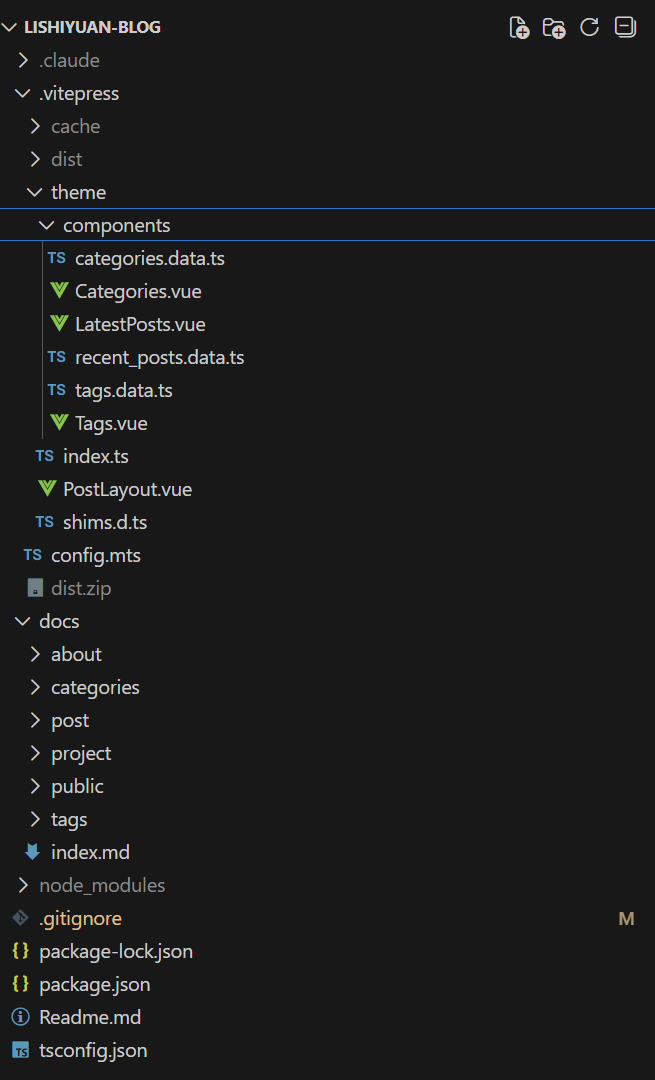这样的形式。还好我的文章多以字符画与代码展示图内容,使得迁移不怎么麻烦,就是可惜了我的几张去玩的照片。
然后是解决引用链接问题,首先对于外部链接也就是非bigbrotherlee.com域名下面的链接是不用修改的。所以只需要修改对应的文章的相互引用就行。[文章名称](文章path)。这个工作量还是蛮大的,不过这也和整理文章一块处理了。
此时我们的目录结构如下

优化布局
config.mts 全局设置如下:
import { defineConfig } from 'vitepress'

export default defineConfig({
  lang: 'zh-Hans',
  srcDir: "docs",
  title: "大家都叫我李哥",
  description: "李哥的技技",
  base: "/",
  cleanUrls: true,
  ignoreDeadLinks: true,
  metaChunk:true,
  head: [
    ['link', { rel: 'icon', href: '/favicon.ico' }],
    ['link', { rel: 'apple-touch-icon', sizes: "180x180", href: "/apple-touch-icon.png" }],
    ['link', { rel: 'icon', type: "image/png", sizes: "32x32", href: "/favicon-32x32.png" }],
    ['link', { rel: 'icon', type: "image/png", sizes: "16x16", href: "/favicon-16x16.png" }],
    ['link', { rel: 'manifest', href: "/site.webmanifest" }],
    ['meta', { name: "author", content: "bigbrotherlee,lishiyuan,李世远,李哥,李大哥" }],
    ['meta', { name: "robots", content: "all" }],
  ],
  themeConfig: {
    logo: "/logo.png",
    nav: [
      { text: '首页', link: '/' },
      { text: '分类', link: '/categories/' },
      { text: '标签', link: '/tags/' },
      { text: '项目', link: '/project/' },
      { text: '关于我', link: '/about/' }
    ],
    aside: false,
    outline:{
      label: '目录'
    },
    socialLinks: [
      { icon: 'github', link: 'https://github.com/imlishiyuan/' }
    ],
    footer: {
      message: '实践、认识、再实践、再认识,这种形式,循环往复以至无穷,而实践和认识之每一循环的内容,都比较地进到了高一级的程度。',
      copyright: '©2019-至今 李哥的日志'
    },
    search: {
      provider:"local"
    },
    i18nRouting:false,
    darkModeSwitchLabel:"主题",
    lightModeSwitchTitle:"切换到白色模式",
    darkModeSwitchTitle:"切换到深色模式",
    returnToTopLabel:"返回顶部",
    externalLinkIcon:true,
  },
  sitemap: {
    hostname: 'https://blog.lishiyuan.cn'
  }
})
可以看到navbar配置了几个路由对应了docs目录下面的位置,我的文章放在了怕post下面,而分类,标签,项目与关于我页面是需要自己写的,其实也不用完全自己写,只要在原来的布局下面扩展就行。
首页
首页只需要在最下面加一个最新文章列表。
## 最新文章
<LatestPosts/>这需要我实现一个自定义组件,实现逻辑很简单,使用createContentLoader() api加载文档,提取想要的字段与内容就行,可以直接使用AI生成一个。首先是获取最新文章recent_posts.data.ts:
import { createContentLoader } from 'vitepress'

interface Post {
  url: string
  title: string
  date: string
  updated: string
  category: string | null
  tags: string[]
  cover: string | null
  excerpt: string
}

const loader = createContentLoader<Post[]>('post/**/*.md', {
  includeSrc: true,
  render: false,
  excerpt: false,
  transform(data) {
    return data
      .map(({ url, frontmatter, src }) => {
        // 获取与转换信息的逻辑省略
        return {
          url,
          title: frontmatter.title || '无标题',
          date: frontmatter.date || '',
          updated: frontmatter.updated || frontmatter.date || '',
          category,
          tags,
          cover,
          excerpt
        }
      })
      .sort((a, b) => {
        return new Date(b.updated).getTime() - new Date(a.updated).getTime()
      })
      .slice(0, 8) // 只取前8篇
  }
})
export const data = loader.load()
export default loader
导入此数据构建最新文章列表组件:
<template>
  <div class="latest-posts">
    <div v-if="loading" class="loading">加载中...</div>
    <div v-if="error" class="error"> {{ error }}</div>
    <div v-if="posts.length === 0 && !loading" class="empty">
      暂无文章
    </div>
    <div v-for="post in posts" :key="post.url" class="post-card">
      <div class="post-header">
        <h3 class="post-title">
          <a :href="post.url">{{ post.title }}</a>
        </h3>
        <div class="post-meta">
          <span class="post-date">
            创建时间 {{ formatDate(post.date) }}
          </span>
          <span v-if="post.updated && post.updated !== post.date" class="post-updated">
            (最后更新时间: {{ formatDate(post.updated) }})
          </span>
        </div>
      </div>
      <div v-if="post.cover" class="post-cover">
        <img :src="post.cover" :alt="post.title" loading="lazy" />
      </div>
      <div class="category-tags-container">
        <div v-if="post.category" class="post-category">
          <a
            :href="`/categories/?category=${encodeURIComponent(post.category)}`"
            class="category-tag"
            @click.prevent="navigateToCategory(post.category)"
          >
            {{ post.category }}
          </a>
        </div>
        <div v-if="post.tags && post.tags.length" class="post-tags">
          <a
            v-for="(tag, index) in post.tags"
            :key="index"
            :href="`/tags/?tag=${encodeURIComponent(tag)}`"
            class="tag-item"
            @click.prevent="navigateToTag(tag)"
          >
            <i class="icon-tag"></i>
            {{ tag }}
          </a>
        </div>
      </div>
      <div v-if="post.excerpt" class="post-excerpt">
        {{ post.excerpt }}
      </div>
      <div class="post-read-more">
        <a :href="post.url">阅读全文 →</a>
      </div>
    </div>
  </div>
</template>

<script setup lang="ts">
import { ref, onMounted } from 'vue'
import { data } from './recent_posts.data'

interface Post {
  url: string
  title: string
  date: string
  updated: string
  category: string | null
  tags: string[]
  cover: string | null
  excerpt: string
}

const loading = ref<boolean>(true)
const error = ref<string | null>(null)
const posts = ref<Post[]>([])


onMounted(async () => {

  try {

    const result = await data

    console.log(result)

    posts.value = result

    loading.value = false

  } catch (err) {

    error.value = err instanceof Error ? '加载文章失败: ' + err.message : '加载文章失败'

    loading.value = false

  }

})


// 导航到分类页面

const navigateToCategory = (category: string) => {

  window.location.href = `/categories/?category=${encodeURIComponent(category)}`

}


// 导航到标签页面

const navigateToTag = (tag: string) => {

  window.location.href = `/tags/?tag=${encodeURIComponent(tag)}`

}


// 格式化日期

const formatDate = (dateString: string): string => {

  if (!dateString) return ''

  try {

    const date = new Date(dateString)

    return date.toLocaleDateString('zh-CN', {

      year: 'numeric',

      month: '2-digit',

      day: '2-digit'

    })

  } catch (e) {

    return dateString

  }

}

</script>


<style scoped>
// 省略样式
</style>
分类页
同理,分类页也是通过API获取全部文章的信息,通过categories分类即可。
import { createContentLoader } from 'vitepress'
interface CategoryPost {
  url: string
  title: string
  date: string
  updated: string
  excerpt: string
  tags: string[]
}

interface Category {
  name: string
  posts: CategoryPost[]
}

const loader = createContentLoader<Category[]>('post/**/*.md', {
  includeSrc: true,
  render: false,
  excerpt: false,
  transform(data) {
    const categoriesMap = new Map<string, CategoryPost[]>()
    data.forEach(({ url, frontmatter, src }) => {
      if (frontmatter.categories) {
        const categories = Array.isArray(frontmatter.categories)
          ? frontmatter.categories
          : [frontmatter.categories]
        categories.forEach(category => {
            // 分类转换
            const post: CategoryPost = {
              url,
              title: frontmatter.title || '无标题',
              date: frontmatter.date || '',
              updated: frontmatter.updated || frontmatter.date || '',
              excerpt,
              tags
            }
            if (!categoriesMap.has(category)) {
              categoriesMap.set(category, [])
            }
            categoriesMap.get(category)!.push(post)
          }
        })
      }
    })
    const categories: Category[] = Array.from(categoriesMap.entries())
      .map(([name, posts]) => {
        posts.sort((a, b) => {
          return new Date(b.updated).getTime() - new Date(a.updated).getTime()
        })
        return {
          name,
          posts
        }
      })
    categories.sort((a, b) => a.name.localeCompare(b.name))
    return categories
  }
})
export const data = loader.load()
export default loader
在自定义组件上使用即可
<template>
  <div class="categories-page">
    <div v-if="loading" class="loading">加载中...</div>
    <div v-if="error" class="error"> {{ error }}</div>
    <div v-if="!loading && !error" class="categories-container">
      <div class="categories-sidebar">
        <h2 class="sidebar-title">文章分类</h2>
        <div class="category-list">
          <div
            v-for="category in categories"
            :key="category.name"
            class="category-item"
            :class="{ active: activeCategory === category.name }"
            @click="selectCategory(category.name)"
          >
            <span class="category-name">{{ category.name }}</span>
            <span class="category-count">({{ category.posts.length }})</span>
          </div>
        </div>
      </div>
      <div class="categories-content">
        <h2 class="content-title">
          {{ activeCategory || '全部文章' }}
        </h2>
        <div v-if="activePosts.length === 0" class="empty">
          暂无文章
        </div>
        <div v-for="post in activePosts" :key="post.url" class="post-card">
          <div class="post-header">
            <h3 class="post-title">
              <a :href="post.url">{{ post.title }}</a>
            </h3>
            <div class="post-meta">
              <span class="post-date">
                创建时间 {{ formatDate(post.date) }}
              </span>
              <span v-if="post.updated && post.updated !== post.date" class="post-updated">
                (最后更新时间: {{ formatDate(post.updated) }})
              </span>
            </div>
          </div>
          <div v-if="post.excerpt" class="post-excerpt">
            {{ post.excerpt }}
          </div>
          <div v-if="post.tags && post.tags.length" class="post-tags">
            <a
              v-for="(tag, index) in post.tags"
              :key="index"
              :href="`/tags/?tag=${encodeURIComponent(tag)}`"
              class="tag-item"
              @click.prevent="navigateToTag(tag)"
            >
              <i class="icon-tag"></i>
              {{ tag }}
            </a>
          </div>
          <div class="post-read-more">
            <a :href="post.url">阅读全文 →</a>
          </div>
        </div>
      </div>
    </div>
  </div>
</template>
<script setup lang="ts">
import { ref, computed, onMounted, watch } from 'vue'
import { data } from './categories.data'

interface Category {
  name: string
  posts: CategoryPost[]
}

interface CategoryPost {
  url: string
  title: string
  date: string
  updated: string
  excerpt: string
  tags: string[]
}

const props = defineProps<{
  defaultCategory?: string
}>()
const loading = ref<boolean>(true)
const error = ref<string | null>(null)
const categories = ref<Category[]>([])
const activeCategory = ref<string>(props.defaultCategory || '')
const activePosts = computed(() => {
  if (!activeCategory.value) {
    const allPosts = categories.value.flatMap(cat => cat.posts)
    return allPosts.sort((a, b) => {
      return new Date(b.updated).getTime() - new Date(a.updated).getTime()
    })
  }
  const category = categories.value.find(cat => cat.name === activeCategory.value)
  return category ? category.posts : []
})

const selectCategory = (categoryName: string) => {
  const newCategory = activeCategory.value === categoryName ? '' : categoryName
  activeCategory.value = newCategory
  const url = new URL(window.location.href)
  if (newCategory) {
    url.searchParams.set('category', newCategory)
  } else {
    url.searchParams.delete('category')
  }
  window.history.pushState({}, '', url.toString())

}
const navigateToTag = (tag: string) => {
  window.location.href = `/tags/?tag=${encodeURIComponent(tag)}`
}
const getCategoryFromUrl = (): string => {
  const urlParams = new URLSearchParams(window.location.search)
  return urlParams.get('category') || ''

}

watch(() => props.defaultCategory, (newCategory) => {
  if (newCategory !== undefined) {
    activeCategory.value = newCategory
  }
}, { immediate: true })

onMounted(async () => {
  try {
    const result = await data
    categories.value = result
    const urlCategory = getCategoryFromUrl()
    if (urlCategory) {
      activeCategory.value = urlCategory
    } else if (props.defaultCategory) {
      activeCategory.value = props.defaultCategory
    }
    loading.value = false
  } catch (err) {
    error.value = err instanceof Error ? '加载分类失败: ' + err.message : '加载分类失败'
    loading.value = false
  }
})
const formatDate = (dateString: string): string => {
  if (!dateString) return ''
  try {
    const date = new Date(dateString)
    return date.toLocaleDateString('zh-CN', {
      year: 'numeric',
      month: '2-digit',
      day: '2-digit'
    })
  } catch (e) {
    return dateString
  }
}
</script>
<style scoped>
</style>
其他页面就不再赘述了。
404页面与文章页面布局修改
我们需要扩展原来的布局,修改404页面展示逻辑与文章页面展示逻辑。404页面给出分类与标签链接按钮。文章详情页头部需要展示标题与分类等等信息,下面需要展示标签。
<!-- .vitepress/theme/PostLayout.vue -->
<template>
  <Layout>

    <template #not-found>
      <!-- 404页面 -->
      <div class="not-found">
        <div class="not-found-content">
          <h1 class="not-found-code">404</h1>
          <h2 class="not-found-title">页面不存在</h2>
          <p class="not-found-description">
            抱歉,您访问的页面不存在或已被移除。
            请检查您输入的网址是否正确,或尝试以下链接。
          </p>
          <div class="not-found-nav">
            <a href="/" class="nav-link home-link">
              <span class="nav-icon">🏠</span>
              <span class="nav-text">返回首页</span>
            </a>
            <a href="/categories/" class="nav-link category-link">
              <span class="nav-icon">📁</span>
              <span class="nav-text">文章分类</span>
            </a>
            <a href="/tags/" class="nav-link tag-link">
              <span class="nav-icon">🏷️</span>
              <span class="nav-text">标签云</span>
            </a>
          </div>
        </div>
      </div>
    </template>

    <!-- 文章头部信息 -->
    <template #doc-before>
      <header class="post-header">
        <h1 class="post-title">{{ frontmatter.title }}</h1>
        <div class="post-meta">
          <div class="meta-item">
            <span class="meta-label">创建时间:</span>
            <span class="meta-value">{{ formatDate(frontmatter.date) }}</span>
          </div>
          <div class="meta-item" v-if="frontmatter.updated && frontmatter.updated !== frontmatter.date">
            <span class="meta-label">更新时间:</span>
            <span class="meta-value">{{ formatDate(frontmatter.updated) }}</span>
          </div>
          <div class="meta-item" v-if="frontmatter.author">
            <span class="meta-label">作者:</span>
            <span class="meta-value">{{ frontmatter.author }}</span>
          </div>
        </div>
        <div class="post-categories" v-if="frontmatter.categories">
          <span class="categories-label">分类:</span>
          <div class="categories-list">
            <a v-for="(category, index) in getCategoriesArray(frontmatter.categories)" :key="index"
              :href="`/categories/?category=${encodeURIComponent(category)}`" class="category-tag">
              {{ category }}
            </a>
          </div>
        </div>
      </header>
    </template>

    <!-- 文章底部信息 -->
    <template #doc-after>
      <footer class="post-footer">
        <!-- 标签列表 -->
        <div class="post-tags" v-if="frontmatter.tags">
          <span class="tags-label">标签:</span>
          <div class="tags-list">
            <a v-for="(tag, index) in getTagsArray(frontmatter.tags)" :key="index"
              :href="`/tags/?tag=${encodeURIComponent(tag)}`" class="tag-item">
              <i class="icon-tag"></i>
              {{ tag }}
            </a>
          </div>
        </div>

      </footer>
    </template>
  </Layout>
</template>

<script setup lang="ts">
import { useData } from 'vitepress'
import DefaultTheme from 'vitepress/theme'
const { Layout } = DefaultTheme

const { frontmatter, page } = useData()

// 格式化日期
const formatDate = (dateString: string): string => {
  if (!dateString) return ''
  try {
    const date = new Date(dateString)
    return date.toLocaleDateString('zh-CN', {
      year: 'numeric',
      month: '2-digit',
      day: '2-digit',
      hour: '2-digit',
      minute: '2-digit'
    })
  } catch (e) {
    return dateString
  }
}

// 处理分类数组
const getCategoriesArray = (categories: string | string[]): string[] => {
  return Array.isArray(categories) ? categories : [categories]
}

// 处理标签数组
const getTagsArray = (tags: string | string[]): string[] => {
  return Array.isArray(tags) ? tags : [tags]
}
</script>

<style scoped>
/* 文章头部 */
.post-header {
  margin-bottom: 2rem;
  padding-bottom: 1.5rem;
  border-bottom: 1px solid var(--vp-c-border);
}

.post-title {
  font-size: 2rem;
  font-weight: 700;
  color: var(--vp-c-text-1);
  margin-bottom: 1.5rem;
  line-height: 1.3;
}

.post-meta {
  display: flex;
  flex-wrap: wrap;
  gap: 2rem;
  margin-bottom: 1.5rem;
  color: var(--vp-c-text-2);
  font-size: 0.9rem;
}

.meta-item {
  display: flex;
  align-items: center;
  gap: 0.5rem;
}

.meta-label {
  font-weight: 500;
  color: var(--vp-c-text-3);
}

/* 分类和标签 */
.post-categories,
.post-tags {
  margin-bottom: 1.5rem;
  display: flex;
  align-items: center;
  gap: 1rem;
  flex-wrap: wrap;
}

.categories-label,
.tags-label {
  font-weight: 500;
  color: var(--vp-c-text-3);
  white-space: nowrap;
}

.categories-list,
.tags-list {
  display: flex;
  flex-wrap: wrap;
  gap: 0.75rem;
}

.category-tag {
  padding: 0.3rem 0.8rem;
  background: var(--vp-c-bg-alt);
  border-radius: 4px;
  font-size: 0.85rem;
  color: var(--vp-c-text-2);
  text-decoration: none;
  transition: all 0.2s ease;
  border: 1px solid var(--vp-c-border);
}

.category-tag:hover {
  background: var(--vp-c-brand-lightest);
  color: var(--vp-c-brand);
  border-color: var(--vp-c-brand);
  transform: translateY(-2px);
}

.tag-item {
  display: inline-flex;
  align-items: center;
  gap: 0.3rem;
  padding: 0.3rem 0.8rem;
  background: var(--vp-c-brand-lightest);
  color: var(--vp-c-brand);
  border-radius: 4px;
  font-size: 0.85rem;
  text-decoration: none;
  transition: all 0.2s ease;
  border: 1px solid var(--vp-c-brand);
}

.tag-item:hover {
  background: var(--vp-c-brand);
  color: white;
  transform: translateY(-2px);
}

/* 文章底部 */
.post-footer {
  margin-top: 3rem;
  padding-top: 2rem;
  border-top: 1px solid var(--vp-c-border);
}

/* 文章底部导航 */
.post-nav {
  display: flex;
  justify-content: space-between;
  gap: 2rem;
  flex-wrap: wrap;
  margin-top: 2rem;
  padding-top: 2rem;
  border-top: 1px solid var(--vp-c-border);
}

.nav-prev,
.nav-next {
  flex: 1;
  min-width: 200px;
}

.nav-link {
  display: block;
  padding: 1rem;
  border-radius: 8px;
  background: var(--vp-c-bg-soft);
  border: 1px solid var(--vp-c-border);
  text-decoration: none;
  transition: all 0.2s ease;
}

.nav-link:hover {
  background: var(--vp-c-brand-lightest);
  border-color: var(--vp-c-brand);
  transform: translateY(-2px);
}

.nav-label {
  display: block;
  font-size: 0.8rem;
  color: var(--vp-c-text-3);
  margin-bottom: 0.5rem;
  font-weight: 500;
}

.nav-title {
  display: block;
  font-size: 1rem;
  color: var(--vp-c-text-1);
  font-weight: 500;
  line-height: 1.4;
}

/* 图标样式 */
.icon-tag::before {
  content: "🏷️";
  font-size: 0.9em;
}

/* 响应式设计 */
@media (max-width: 768px) {
  .post-title {
    font-size: 1.5rem;
  }

  .post-meta {
    gap: 1rem;
  }

  .post-nav {
    flex-direction: column;
  }

  .nav-prev,
  .nav-next {
    width: 100%;
  }
}

@media (max-width: 480px) {
  .post-title {
    font-size: 1.3rem;
  }

  .post-categories,
  .post-tags {
    flex-direction: column;
    align-items: flex-start;
    gap: 0.5rem;
  }

  .categories-label,
  .tags-label {
    white-space: normal;
  }
}

/* 404页面样式 */
.not-found {
  min-height: 80vh;
  display: flex;
  align-items: center;
  justify-content: center;
  padding: 4rem 2rem;
  background: var(--vp-c-bg);
}

.not-found-content {
  text-align: center;
  max-width: 600px;
  width: 100%;
}

.not-found-code {
  font-size: 8rem;
  font-weight: 900;
  color: var(--vp-c-brand);
  margin: 0;
  line-height: 1;
  text-shadow: 0 4px 8px rgba(0, 0, 0, 0.1);
  animation: pulse 2s ease-in-out infinite;
}

.not-found-title {
  font-size: 2rem;
  font-weight: 700;
  color: var(--vp-c-text-1);
  margin: 1rem 0;
}

.not-found-description {
  font-size: 1.1rem;
  color: var(--vp-c-text-2);
  line-height: 1.6;
  margin-bottom: 2.5rem;
}

.not-found-nav {
  display: flex;
  justify-content: center;
  gap: 1.5rem;
  flex-wrap: wrap;
}

.not-found-nav .nav-link {
  display: flex;
  flex-direction: column;
  align-items: center;
  gap: 0.75rem;
  padding: 1.5rem;
  background: var(--vp-c-bg-soft);
  border: 1px solid var(--vp-c-border);
  border-radius: 12px;
  text-decoration: none;
  transition: all 0.3s ease;
  min-width: 120px;
}

.not-found-nav .nav-link:hover {
  background: var(--vp-c-brand-lightest);
  border-color: var(--vp-c-brand);
  transform: translateY(-8px) scale(1.05);
  box-shadow: 0 8px 24px rgba(0, 0, 0, 0.15);
}

.nav-icon {
  font-size: 2rem;
  line-height: 1;
}

.nav-text {
  font-size: 1rem;
  font-weight: 500;
  color: var(--vp-c-text-1);
}

/* 404页面动画 */
@keyframes pulse {

  0%,
  100% {
    transform: scale(1);
  }

  50% {
    transform: scale(1.05);
  }
}

/* 404页面响应式设计 */
@media (max-width: 768px) {
  .not-found {
    padding: 3rem 1.5rem;
  }

  .not-found-code {
    font-size: 6rem;
  }

  .not-found-title {
    font-size: 1.5rem;
  }

  .not-found-description {
    font-size: 1rem;
    margin-bottom: 2rem;
  }

  .not-found-nav {
    gap: 1rem;
  }

  .not-found-nav .nav-link {
    padding: 1.25rem;
    min-width: 100px;
  }

  .nav-icon {
    font-size: 1.5rem;
  }

  .nav-text {
    font-size: 0.9rem;
  }
}

@media (max-width: 480px) {
  .not-found {
    padding: 2rem 1rem;
  }

  .not-found-code {
    font-size: 4rem;
  }

  .not-found-title {
    font-size: 1.25rem;
  }

  .not-found-description {
    font-size: 0.9rem;
  }

  .not-found-nav {
    flex-direction: column;
    align-items: center;
  }

  .not-found-nav .nav-link {
    width: 100%;
    max-width: 200px;
    flex-direction: row;
    justify-content: center;
    padding: 1rem;
  }

  .nav-icon {
    font-size: 1.25rem;
  }

  .nav-text {
    font-size: 1rem;
  }
}
</style>
最后注册自定义布局与自定义组件就可以在直接生效或者可以被使用了。
// .vitepress/theme/index.ts
import DefaultTheme from 'vitepress/theme'
import type { EnhanceAppContext } from 'vitepress'
import LatestPosts from './components/LatestPosts.vue'
import Categories from './components/Categories.vue'
import Tags from './components/Tags.vue'
import PostLayout from './PostLayout.vue'


export default {
  ...DefaultTheme,
  Layout:PostLayout,
  enhanceApp({ app }: EnhanceAppContext) {
    // 注册全局组件

    app.component('LatestPosts', LatestPosts)
    app.component('Categories', Categories)
    app.component('Tags', Tags)
  }
}
遇到的问题
整个迁移过程中还是遇到一些问题的
文章泛型错误识别为标签
由于vitepress里面的md文档是可以使用组件的,我文章中写的Class<T>类似的泛型,在没有使用代码片段包围的情况下会被识别为html标签。这样在md编译成html过程中就会报错 element no end tag。解决这个问题需要将非代码块的所有泛型类使用行内代码包围,如下:
`Class<T>` 这样就不会编译错误了nginx刷新404
如下设置,关键是这行:try_files $uri $uri.html $uri/ /index.html;
server {
    listen 80;
    listen [::]:80;
    server_name localhost;

    location / {
        root /usr/share/nginx/html;
        index index.html;
        try_files $uri $uri.html $uri/ /index.html;
    }

    # 自定义 404 页面(VitePress 构建后会生成 404.html)
    error_page 404 /404.html;

    location = /404.html {
        root /usr/share/nginx/html;
        internal;  # 防止直接访问 /404.html 时状态码为 200
    }

    # 保留服务器错误页面
    error_page 500 502 503 504 /50x.html;
    location = /50x.html {
        root /usr/share/nginx/html;
    }
}
下一步是什么?
- [x] 真正分离博客站点与日志站点
- [ ] 重新为这两个站实现各自的主题。